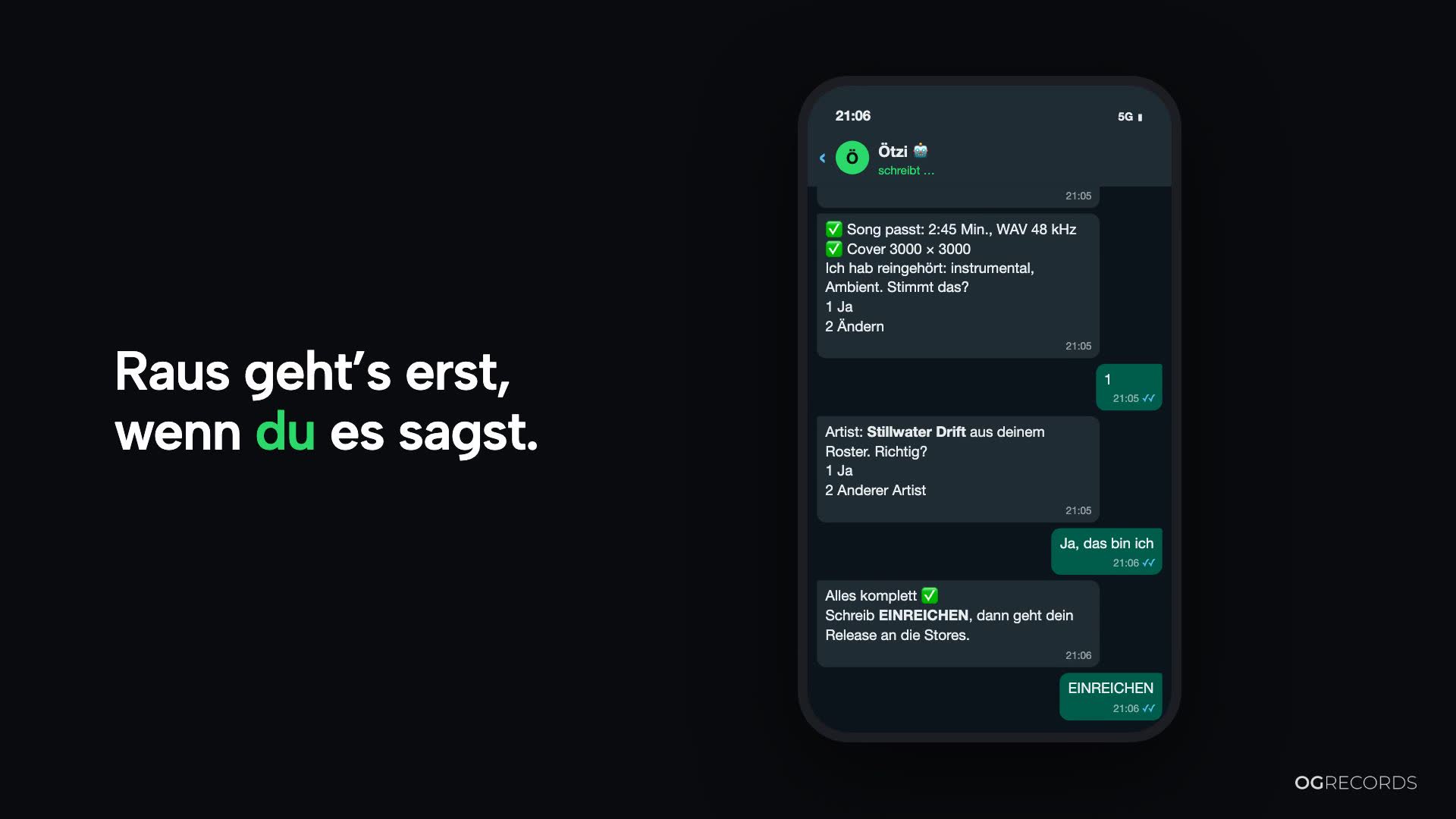
Ötzi: Your release on WhatsApp
You have a finished song on your phone and want to release it. Until now that meant: open the laptop, click through a form, upload files. With Ötzi it happens in a WhatsApp chat. Ötzi is the AI assistant of OGRECORDS™. You send song and cover, Ötzi asks the questions and checks the files. Nothing is submitted until you say so.
How a release with Ötzi works
- Connect WhatsApp. Connect your number once under Settings → Notifications. From then on Ötzi knows which account you belong to.
- Send song and cover. Forward the files or send a Dropbox, Google Drive or OneDrive link. You can send everything at once: song, cover and title. Ötzi sorts it and only asks for what is missing.
- Answer the questions. Ötzi only ever asks one thing at a time and remembers what is already there.
- Write SUBMIT. At the end Ötzi shows you a summary. Only when you write “SUBMIT” does your release go out.
What Ötzi asks
Ötzi asks the same things as the release assistant on the web and in the app:
- type and title, artist and featured artists
- genre, language and whether the song is explicit
- whether and how AI was involved and whether there are samples
- who co-wrote and produced it, with legal names
- who gets which share of the earnings
- cover, release date and stores
For the artist, Ötzi looks up your profile on Spotify and Apple Music and sends you the links. You confirm it really is you. New artists Ötzi creates right away.
What Ötzi checks
As soon as a file arrives, Ötzi writes “One moment, I’m checking” and comes back with the result. The technical check covers format, length, loudness, peak level and the cover size. On top, an AI listens into your song and looks at the cover: language, genre, possible explicit content, text or logos in the image. These are suggestions. You confirm or correct them, nothing is applied without you.
If you send a song as audio instead of as a file, WhatsApp turns it into an MP3. Ötzi then tells you it needs the lossless file: WAV, FLAC or AIFF, sent via the paperclip as a document.
You stay in control
Whether a release is submitted is not decided by the AI. Fixed program code checks it: exactly your word, exactly the summary you saw. If anything changes afterwards, you get a new summary.
Because nobody ticks boxes in a chat, we log every step in a tamper-evident way. After submitting you get the submission record as a PDF.
After submitting, Ötzi no longer changes anything about your release. You make corrections on the web or in the app as usual.
After submitting
- Your smart link lands right in the chat.
- You get the label copy as a PDF.
- If you want, Ötzi lets you know when something needs fixing, when the release has been delivered and when it is live. Just say “YES” when submitting. “STOP” ends the messages at any time.
Ötzi knows your account
Ask Ötzi about the status of your releases, your streams, your balance, your payouts or your smart links. Continue drafts from the web or the app in the chat. And if something gets stuck, Ötzi brings in someone from our team.
Ötzi writes in your language, in all 11 languages of OGRECORDS™. In your chat Ötzi only shows data of your own account.
What you need
- an OGRECORDS™ account with completed onboarding
- a connected WhatsApp number
- your song as WAV, FLAC or AIFF and your cover as JPG or PNG, ideally 3000 × 3000 pixels
Ötzi is new and still in BETA. If something doesn’t work, just tell Ötzi. Everything else is on the Ötzi page.
New